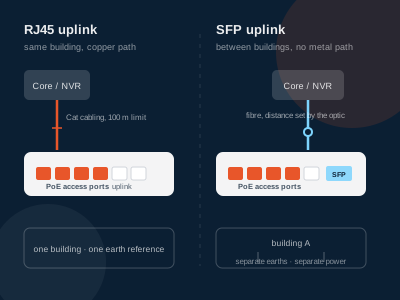
A PoE switch has two kinds of port: the powered downlinks that run to cameras and access points, and a small group of uplinks whose only job is to carry the collected traffic out of the chassis. On the models here that uplink group is two gigabit copper ports, sometimes with one 1000Base-X SFP slot beside them and sometimes with two. Deciding between the copper uplink and the SFP slot is a decision about run length, earth isolation and what the cable shares a duct with — not about how well the switch performs.
What does an uplink port on a PoE switch actually do?
An uplink port is the switch's exit: it connects to the NVR, the core switch or the router, and it does not power anything. Every frame from every camera crosses it, so its speed sets the ceiling for the whole unit, while its physical type — copper RJ45 or an SFP slot — only decides what medium the traffic leaves on.
Two numbers in the datasheet matter more than the rest: how many uplink ports there are, and whether the access ports are 100M or gigabit. A 100M access model can still have a gigabit uplink, and on this range most of them do: the eight-port 100M unit carries two 10/100/1000Base-T uplink ports and one 1000Base-X SFP slot. That asymmetry is deliberate. One camera rarely needs more than a few megabits; eight cameras together do, and the place where their traffic piles up is the uplink.
How much traffic does one uplink have to carry?
The arithmetic is short. Take each camera's configured bitrate, multiply by the number of cameras, and compare the total with the uplink speed — remembering that recording traffic and live viewing traffic are the same traffic on the wire.
| Site pattern | Per-camera bitrate | Total on the uplink | 100M uplink | Gigabit uplink |
|---|---|---|---|---|
| 4 fixed domes | 4 Mbps | 16 Mbps | comfortable | comfortable |
| 8 fixed cameras | 6 Mbps | 48 Mbps | workable at 48% | comfortable |
| 16 cameras, mixed | 6 Mbps | 96 Mbps | at the limit | comfortable |
| 24 cameras, mixed | 6 Mbps | 144 Mbps | not workable | comfortable |
| Same 24 cameras + NVR playback | 6 Mbps + one stream | 150 Mbps peak | not workable | comfortable |
Three things break the comfortable column. Multi-sensor and 4K cameras that run 12–20 Mbps each; several cameras behind a single port through a small non-PoE switch or a daisy chain; and NVR playback or a site-wide firmware push, which adds a second copy of the stream while live traffic continues. Any of those moves the design to a gigabit uplink — which is why the uplink is usually the first port to become the bottleneck on a site built around 100M access switches.
If the uplink is what you are sizing, the 20–30% reserve that applies to the power budget applies here too: a gigabit uplink at 60% of capacity leaves room for the cameras added in year three.
When does the SFP slot earn its place over a copper uplink?
There are exactly three reasons to leave the building on fibre, and each is about the path rather than the port.
The first is distance. Copper Ethernet channels are specified to 100 m, and nothing about a PoE switch changes that. If the core is in another building or at the far end of a yard, the SFP slot is the way out; the options for runs past 100 m compare the three ways of getting there, and only one keeps the same PoE budget at the far end.
The second is electrical isolation. Fibre carries no metallic path, so a surge on one building's earth cannot travel down the uplink into the other. Where two buildings sit on separate earth references and a buried copper run would tie them together, the SFP slot removes the problem instead of protecting against it. Outdoor poles, gatehouses and car-park cabinets fall into the same category.
The third is the duct. Where a run shares a tray with motor cabling, passes through a lift shaft or crosses a welding area, copper picks up noise that shows as retransmissions and, occasionally, as link flapping. Fibre is immune to it.
Everything else argues for copper: no module, no cleaning kit, no spare optic on the shelf, and any technician can test it with a cable tester.
What does the SFP uplink port not do?
It does not supply power. There is no PoE on a fibre link, and none on the slot either. A remote PoE switch at the far end needs its own local supply — the first question on any inter-building job, and usually the one settled last.
It does not specify the optics. The switch datasheet stops at "1000Base-X SFP": that is the electrical interface the slot accepts, and it says nothing about wavelength, fibre type or reach. Those come from the transceiver and the cable plant, matched to your own link plan — a separate procurement decision from the switch. Do not assume a module works because it fits.
It does not fall back to copper. On the models here the SFP slot is a separate port counted alongside the two copper uplinks, not a combo port paired with one of them, so the copper ports remain available whether or not the slot is populated. Check this on any model you compare: on combo designs the paired copper port goes dark when the slot is used.
How do you choose between the two uplinks for a project?
| Project condition | Uplink to specify | Why |
|---|---|---|
| Core switch in the same rack or room | RJ45 copper | No module cost, no cleaning, shortest path |
| Run under 100 m inside one building | RJ45 copper | Fibre adds cost and a failure point for no benefit |
| Second building or separate earth | 1000Base-X SFP | Removes the metallic path between earth references |
| Run over 100 m, or through a yard | 1000Base-X SFP | Copper channels stop at 100 m |
| Shared tray with motor or lift cabling | 1000Base-X SFP | No susceptibility to induced noise |
| Endpoint needs 2 km of reach | 1000Base-X SFP | Distance is set by the optic and fibre, not the switch |
| Uplink must also carry a UPS-backed core | RJ45 copper | Fewer active components to fail in a cabinet |
The PoE switches with SFP uplink page lists the 13 models in this range that carry the slot; the full PoE switch range lists the copper-only units alongside them.
What should the datasheet say before you order?
The uplink is where port count, access speed and power budget all have to agree, so read the three columns together.
| Powered ports | Access speed | Uplink ports | SFP slots | PoE budget | Models |
|---|---|---|---|---|---|
| 4 | Gigabit | 2 × gigabit copper | 1 | 65 W | HX-0403PEG |
| 4 | 100M | 1 × gigabit copper | 1 | 65 W | HX-X0402PEG |
| 8 | 100M | 2 × gigabit copper | 1 | 120 W | HX-0803PE |
| 8 | Gigabit | 2 × gigabit copper | 1 | 120 W | HX-0803PEG, HX-X0803PEG |
| 16 | 100M | 2 × gigabit copper | 1 | 330 W / 200 W | HX-1603PE, HX-X1603PE |
| 16 | Gigabit | 2 × gigabit copper | 1 | 330 W / 200 W | HX-1603PEG, HX-X1603PEG |
| 24 | 100M | 2 × gigabit copper | 2 | 400 W | HX-2404PE |
| 24 | Gigabit | 2 × gigabit copper | 2 | 400 W | HX-2404PEG |
| 24 | 100M | 2 × gigabit copper | 1 | 300 W | HX-X2403PE |
| 24 | Gigabit | 2 × gigabit copper | 1 | 300 W | HX-X2403PEG |
All of these run from AC 100–240 V; the 16- and 24-port chassis are 310 mm or 486 mm wide by 44 mm high. Working temperature and switching capacity are not printed on every model page in this range — ask us for the datasheet rather than inferring them from the port count.
The selection that goes wrong most often is a 24-port unit ordered with one SFP slot when the site plan already has two outbuildings. A second slot costs less than a second switch.
FAQ
Does the SFP uplink port supply PoE power?
No. The slot is a data interface for a fibre module; it has no PSE controller and delivers no power. Devices that need power must be on the numbered PoE access ports, and a remote switch reached over fibre needs its own local power supply at the far end.
Can I use the copper uplinks and the SFP slot at the same time?
On the models here, yes — the SFP slot is listed as a separate port alongside the two copper uplinks, so all three can be in service and give three separate uplink paths. On other vendors' combo ports the paired copper port is disabled once the slot is populated, so verify the port list on any datasheet you compare.
Is a 100M access switch limited to a 100M uplink?
No, and that is the point of the layout on this range. Most 100M access models here carry gigabit uplinks, so the camera ports stay at 100M while the aggregated traffic leaves at 1 Gbps. What you cannot do is run 24 cameras at full bitrate into a 100M uplink.
If the run is short, is the SFP slot wasted?
It is unused cost unless the site is expected to grow. A switch with the slot bought "just in case" is cheap insurance; a module bought "just in case" is not, because the fibre type and reach have to match a link that does not exist yet. Specify the slot when the plan already shows a fibre path; otherwise order the copper-only model.