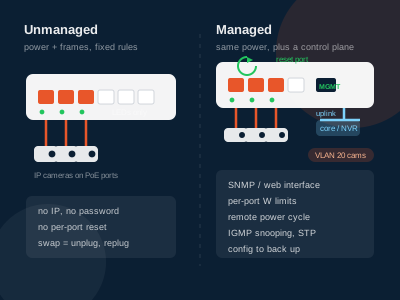
The difference is where the configuration lives. An unmanaged PoE switch powers every port and forwards frames with fixed rules and no user interface; a managed one adds a control plane — VLANs, per-port power limits, remote power cycling, SNMP — and with it an owner, a firmware lifecycle and a configuration that has to survive the next engineer. On a camera site that trade is usually settled by who will be on site at 3 a.m., not by the port count.
What does an unmanaged PoE switch actually do?
An unmanaged switch is a power supply with a switch fabric bolted to it. It performs the 802.3af/at/bt detect-and-classify handshake per port, delivers the negotiated class power, forwards Ethernet frames on a self-learning MAC table, and does nothing else. There is no IP to allocate, no password to lose, no configuration to restore after a swap, and no firmware window to schedule.
That is not a criticism. A 24-port unit with a 400 W supply feeding twenty-two cameras in a telecom closet is doing one job and needs no intelligence to do it. The failure surface is small: a power supply, a controller and, if the chassis needs one, a fan.
What it cannot do matters, because buyers routinely assume these features exist on the model they are looking at:
| Capability | Unmanaged | Managed |
|---|---|---|
| Per-port power on/off and reset | No | Yes |
| Per-port wattage limit | No | Yes, usually settable |
| PoE scheduling (off outside business hours) | No | Yes |
| PoE telemetry (watts per port, history) | No, LEDs only | Yes, via UI or SNMP |
| VLAN segmentation | No — forwards tagged frames transparently | Yes |
| IGMP snooping for multicast video | No, floods | Yes |
| Spanning tree / loop detection | No | Yes |
| Link aggregation, port mirroring, QoS | No | Yes |
| Remote upgrade and configuration backup | Not applicable | Yes |
An unmanaged switch still passes VLAN-tagged frames from a managed core to an endpoint correctly — it just does not understand or enforce them. That single fact is what makes the hybrid designs below work.
What does management add that a camera site can genuinely use?
Management features split into two groups: those that change what happens on a bad night, and those that make a tender document look thorough. Five in the first group are worth pricing.
Remote power cycling of a single port. Cameras and access points freeze, and a frozen camera with a live PoE link looks healthy to the switch. A managed switch resets that port from a browser in ten seconds; an unmanaged one needs a physical unplug, which takes every camera on that chassis offline. One avoidable site visit a month pays for the difference in hardware within a year — this, not VLANs, is the strongest argument for management on a surveillance network.
A per-port wattage ceiling. A device that fails and draws more than its class allows is disconnected by the PSE — but on unmanaged hardware the thresholds are the standard's, not yours. A settable limit caps a marginal run at 20 W, so a failing PTZ trips its own port instead of dragging the shared supply down and rebooting its neighbours at dusk, when every IR illuminator switches on.
IGMP snooping. Multicast video from several cameras, or a single stream fanned out to multiple viewers, is flooded to every port by an unmanaged switch. On eight cameras that is noise; on sixty it saturates the uplink and the NVR starts dropping frames that nobody can explain. Snooping keeps each stream on the ports that asked for it.
Loop detection and spanning tree. A patch cord in two ports of the same switch is a broadcast storm, and an unmanaged switch has no defence. Any rack that non-installers can reach is a rack where this eventually happens.
VLAN segmentation. Cameras belong on their own broadcast domain, isolated from staff PCs and guest Wi-Fi, usually with the NVR dual-homed. That needs a managed switch somewhere — but not necessarily at the edge. If a managed core exists, the edge can stay unmanaged; this is why "do I need managed switches" and "do I need a managed edge" are different questions.
When is an unmanaged switch the correct specification?
Unmanaged is the right answer more often than vendors of managed gear imply, in three recognisable situations.
The edge of a managed network. A managed core with a fibre or copper uplink to each floor, and unmanaged 8- or 16-port units at the floor. Configuration lives in one place, spare units are interchangeable and cheap, and a failed edge switch is a swap rather than a restore.
Small, fixed sites. A shop, a villa, a single gatehouse with four cameras and one access point. Nothing here benefits from a UI nobody will log into, and the 100 m channel keeps the topology trivial.
OEM and private-label programmes. A simpler chassis has fewer firmware variants to maintain per customer, which matters when a buyer needs a stable BOM for a multi-year rollout rather than a feature list. Our unmanaged switch range covers 4, 8, 16 and 24 powered ports, 65 W to 400 W budgets and 100M or gigabit access ports — browse the PoE switch range, or see how port count and budget interact in the range selection matrix. Where a project needs a managed control plane, that is a different specification and we will say so rather than sell an unmanaged unit against it.
What does a managed switch cost to own?
The purchase order is the smallest part. A managed switch introduces an owner: someone to set a management VLAN, change the default credentials, back up the configuration before the first failure, track firmware advisories, and hold a spare unit or a documented recovery procedure. On a site with no IT function that ownership either does not happen — leaving an unconfigured managed switch behaving like an expensive unmanaged one — or it is outsourced and billed annually.
There is also a recovery cost. Replacing an unmanaged switch is a physical swap: unplug eight patch cords, replug them in the same order, done. Replacing a managed switch without a usable configuration backup can take an afternoon of rebuilding VLANs, port profiles, PoE limits and uplink settings from memory.
Can a managed core carry unmanaged edge switches?
Yes, and it is the standard way to segment a network without managing every closet. The core holds the VLAN interfaces, the routing policy between camera and corporate traffic and the IGMP querier; the edge forwards tagged frames to endpoints configured with the right VID on the camera side, usually by the camera or NVR itself.
Two rules keep it clean. Give each edge switch its own uplink port or VLAN, so one mis-patched cord cannot merge two floor segments; and treat the edge as dumb transport, since nothing that depends on the switch's own logic can be specified on it.
What should be on the specification before you request a quotation?
Write down the device list first: every powered endpoint, its PoE class, its measured rather than nameplate draw, and its location. Then the delivery numbers: total budget with 20–30 % headroom, per-port class, port count including spare, uplink type and speed. Then the operating conditions: indoor closet or unenclosed cabinet, ambient range, and whether the enclosure sees afternoon sun. Then the operational question — who resets a frozen camera, and how far away they are.
That last item decides unmanaged versus managed more often than any feature table. Where the answer is "nobody, until Monday", buy the management. Where the answer is "the site engineer, who is there daily", an unmanaged edge with a short spare list serves the project better and for longer.
For enclosure dimensions, input range and operating temperature of any model, contact us for the datasheet — those figures are quoted per variant rather than held constant across the series.
FAQ
Is a managed PoE switch more reliable than an unmanaged one?
Not in the sense most buyers mean. The power stage and the forwarding hardware are similar; if anything an unmanaged switch has fewer things to fail, because it has no management plane, configuration flash or web service. The gain from management is operational: a frozen endpoint can be reset remotely, so the visible outage is shorter even when the hardware is identical.
Do I need VLANs for an IP camera system?
Only if the cameras share infrastructure with staff traffic, guest Wi-Fi or building management systems, or if a policy requires camera video to be isolated. A dedicated camera network that terminates on its own NVR and switch ports needs no VLAN at all.
Can an unmanaged PoE switch be monitored at all?
Only through its LEDs, plus whatever the upstream managed switch or the NVR can see. It cannot report per-port wattage, PoE class, or a port that stopped delivering power while keeping the link up. That blind spot is the practical reason to manage a switch you cannot walk up to.
Is a smart or web-managed switch the same as a managed switch?
It is a middle tier, and the label is not standardised. Web-managed units typically expose a browser interface with a subset of L2 features and often skip SNMP, per-port PoE scheduling or configuration backup. Check the feature list line by line rather than the product name, and confirm remote port power cycling and per-port wattage limits — those two carry most of the operational value.